
DTP Translation Starts Before Translation: How File Preparation Keeps Your Translation Memory Clean and Cuts Costs
DTP translation starts before a single sentence is translated. File preparation turns PDFs, scans and legacy layouts into clean, editable source files, removes broken sentences, hard returns and stray tags, and plans ahead for fonts and text expansion. DEMA Solutions’ in-house DTP team prepares every file this way, so translation runs on whole sentences, your translation memory stays clean and each new release costs less.
Who this guide is for
This article is for the people who send documents out for translation and live with what comes back: technical documentation managers, technical writers, localization managers and the procurement colleagues who sign off the invoices. Most work at manufacturers whose manuals, spare parts catalogues and brochures are built in InDesign, FrameMaker, Word or XML, often alongside PDFs whose source files nobody can find any more. Their questions are practical: why layouts come back broken, why every release costs almost as much as the first, what to send and how long preparation takes.
What file preparation means in DTP translation
Every translated document goes through three stages: the source file is prepared, the text is translated, and the translated file is laid out again in every language. Most attention goes to the last two, because they are the ones a reader sees. The first decides how smoothly, and how cheaply, everything else runs.
File preparation, sometimes called pre-translation processing, means getting a source file ready for the translation tools that will read it. A DTP specialist works in the original application and removes everything that would confuse those tools: forced line breaks, sentences split across separate text frames, inconsistent styles, hidden or overset text, manual hyphens, and text inside images or converted to outlines. Where the only source is a PDF or a scan, preparation starts by rebuilding an editable file.
The finished file looks the same to a reader. To a translation tool it is a different document: whole, consistent sentences that can be translated once and reused for years. That is why file preparation for translation belongs inside the project, not outside it as an optional extra.
Why preparation decides quality, cost and memory reuse
Translation tools split a document into segments, usually sentences, and store every translated segment in your translation memory with its source. When the same sentence appears again, in the next revision or in a manual for a similar machine, the memory offers the approved translation. That is the mechanism behind lower costs on repeat content, and it depends entirely on the segments being right.
A broken sentence becomes two half-sentences in the memory. A line break in the middle of a sentence makes the tool treat each half as a separate segment. The translator sees fragments without context, which invites mistranslation where word order changes, and both fragments are stored as if they were complete. When the sentence appears unbroken in the next manual, the memory does not recognise it, and you pay for it again.
Small formatting differences turn exact matches into partial ones. A word bold in one version and not in another, or an extra style tag, makes the memory see two different segments, and a linguist has to edit text that was already approved.
Tags multiply and errors follow. Every unnecessary style change or character override becomes a tag the translator must place correctly. Tags slow translation down, and a misplaced one can break a cross-reference or lose a bold warning word.
Text that never reaches the memory is handled by hand every time. Text inside images or converted to outlines is invisible to translation tools, so it is translated outside the memory at every release.
Each problem is small on one document. Over years of releases they decide how much content is reused and how much is paid for again. That is why owning your translation memory only pays off fully when the segments inside it are clean: a memory full of fragments is an asset you own but cannot use well.
Why files arrive unprepared
Files sent for translation are rarely prepared, and almost never on purpose. Many document owners assume a file that looks perfect in print can go to translation as it is, without knowing that a translation tool reads the file’s structure, not its appearance. Deadlines push files out unchecked, and the problems surface later, multiplied by the number of languages. Layouts built in InDesign, FrameMaker or Illustrator need specialist skills to prepare, so preparation is skipped when those skills are missing. And skipping it looks cheaper on one project while costing more in corrections and lost reuse on the next ones, a point our article on what drives the cost of translating technical manuals makes from the budget side.
Starting from PDFs, scans and legacy files
The hardest starting point is a document that exists only as a PDF or a scan, and it is a common one: a manual whose layout files were lost when a supplier changed, or a catalogue inherited through an acquisition. A PDF is a print format that stores text as positioned lines, not flowing sentences, so a translation tool reading it directly sees broken fragments. A scan contains no text at all, only an image of it.
For scans, the first step is optical character recognition (OCR), which converts the image into real characters. OCR is never the end of the job. Technical documents are full of part numbers, units, tolerances and symbols, and OCR misreads exactly these: a lowercase l becomes a 1, a degree sign disappears, a decimal comma turns into a full stop. The recognised text has to be proofread against the original, then the structure rebuilt: real paragraphs instead of single lines, real tables, styles for headings, warnings and captions, and graphics separated from text. For text-based PDFs the text can be extracted, but the layout still has to be rebuilt so it can reflow when the translation is longer. Rebuilding takes time, and original layout files, when they exist anywhere, always give a better and cheaper result, so it is worth asking your former supplier or design studio first.
Rebuilding has a second benefit. If old translations of the document exist, the clean source and those translations can be paired sentence by sentence, and aligning legacy translations into a translation memory recovers work you have already paid for.
What preparation involves, format by format
Every format has its own habits and its own traps. The principle stays the same, whole sentences and predictable reflow, but the work behind it differs.
InDesign. Most brochures, catalogues and many manuals are built in InDesign, which makes InDesign translation the most frequent DTP job. Preparation means threading stories instead of leaving them in separate frames, removing forced line breaks and manual hyphens, converting tab-built columns into real tables, replacing local overrides with styles, and checking for overset or hidden text. Missing fonts and links are resolved before anything is exported.
FrameMaker. Long manuals often live in FrameMaker books with conditional text, variables, cross-references and markers. Preparation checks which conditions are translated, that variables are used rather than retyped, and that cross-references survive the round trip. A broken cross-reference in the source becomes a broken one in every language.
Illustrator. Diagrams and exploded views often carry text converted to outlines, which must be recreated as live text, and labels made of separate lines that need joining so each label is one segment. Text inside raster images has to be recreated, or the image supplied in layers.
Word. Word files look simple and are often the messiest: tracked changes, hidden text, floating text boxes and paragraphs built with spaces and line breaks. Preparation means clearing revisions, applying styles and removing spacing made of empty paragraphs.
XML and DITA. Structured content is already separated from layout, but translation tools still need to know which elements are translatable, how inline elements behave and how reused topics and content references fit together. Preparation here is mostly configuration and testing, so that publishing works in every language before translation starts.
CAD drawings with callouts. Drawings and wiring diagrams carry callouts, notes and title block text in text objects, block attributes or annotations. Preparation extracts only what should be translated, keeps reference designators and part numbers locked, and plans where longer text will fit on a drawing that cannot move.
The most common problems we fix
Whether the source is a manual, a spare parts catalogue or a brochure, the same issues come back.
Typographical noise
Double spaces, indents built with spaces and stray characters look harmless on screen, but they affect how text is segmented and how it reflows once a longer language replaces the source.
Broken sentences
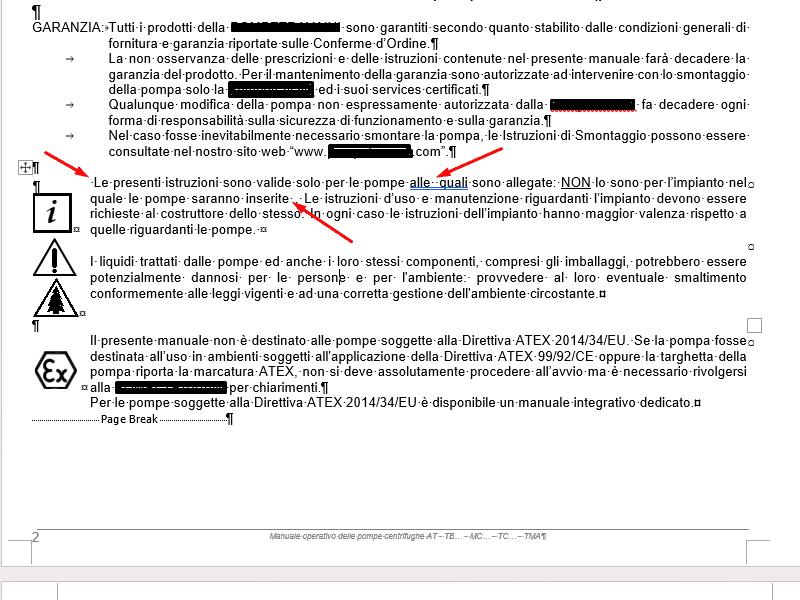
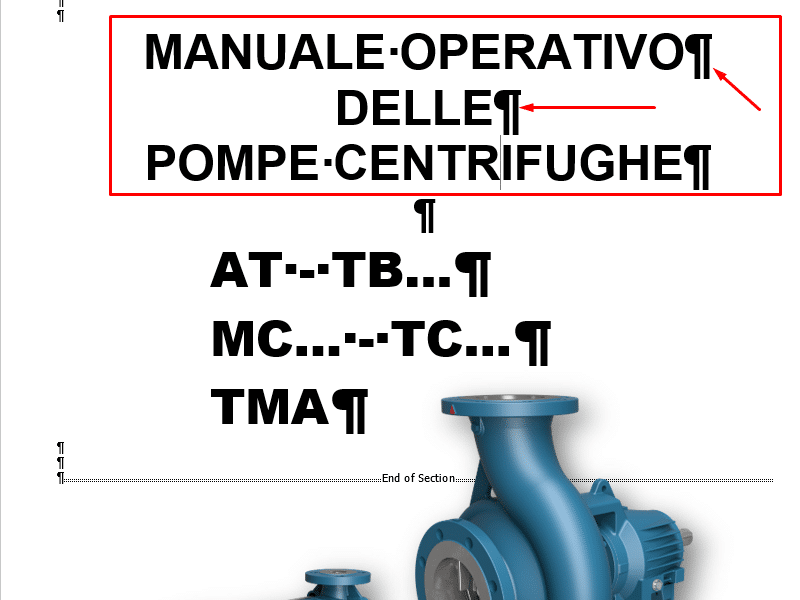
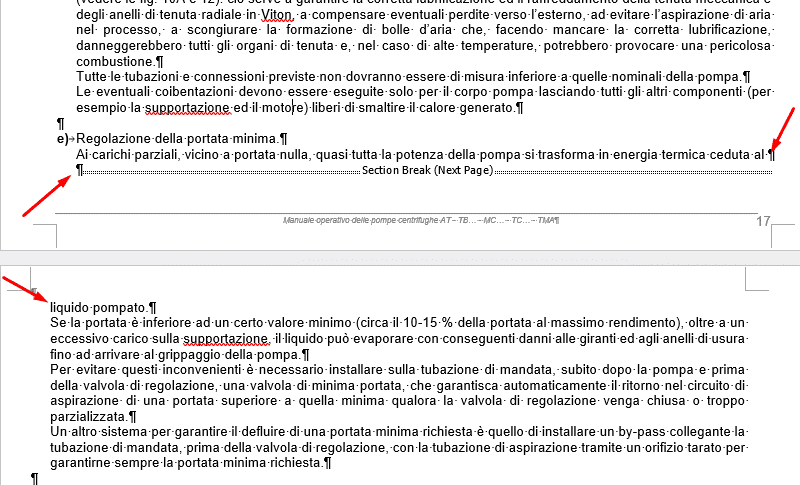
Hard returns in the middle of a sentence split it into two segments. They are the biggest single cause of memory pollution, because neither half will ever match the complete sentence again.
Incorrect hyphenation
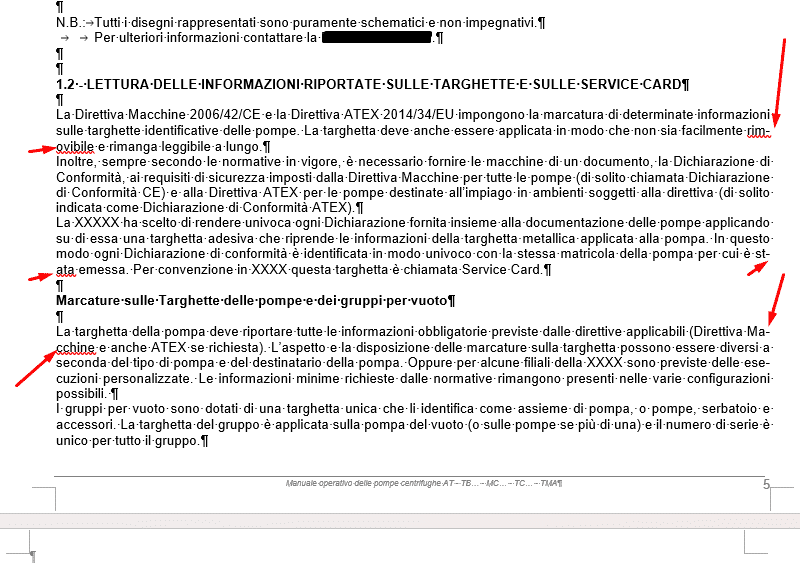
Manual hyphens split words so a tool sees two different words. Automatic hyphenation keeps words whole and lets each language follow its own rules.
Improper page and frame breaks
A page or frame break inside a sentence splits it across two text blocks, which invites omissions and makes the translated sentence impossible to reflow correctly.
Tables and tabbed columns
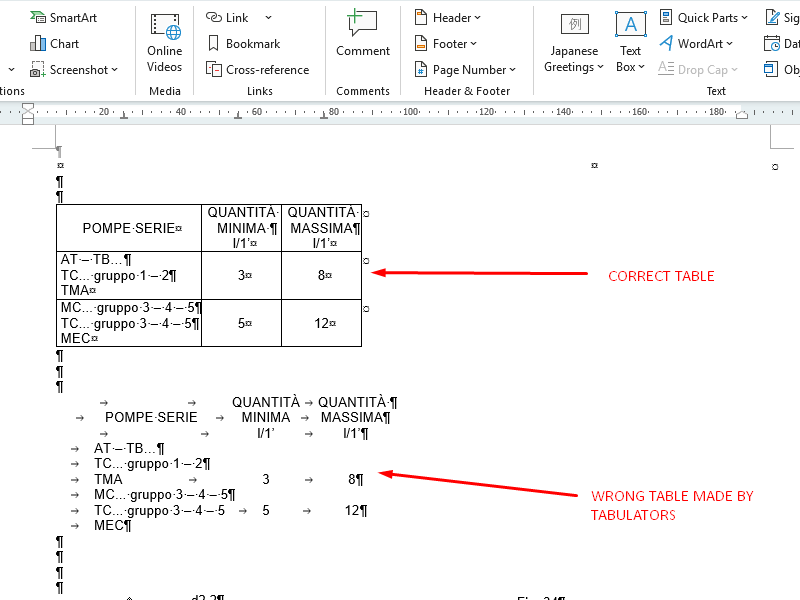
Tables with merged cells and paragraph marks inside cells misalign once the text changes length, and columns built with tabs turn each line into one segment mixing several cells, so the translator cannot tell where one value ends. Text in images and outlines has to be recreated as live text, and heavily tagged text has to be cleaned back to styles so tags carry meaning instead of noise.
Fonts, scripts and text expansion
Two layout questions have to be answered before translation, not after: will the fonts work in every target language, and where will the extra text go?
Many corporate typefaces cover Western European languages but not the full character set of Central and Eastern European languages, let alone Cyrillic, Greek, Chinese or Arabic. A missing character shows up as an empty box or is silently replaced by another font, which is easy to miss in a long manual. Preparation means checking every font against every target language, agreeing brand-compatible substitutes and confirming licences. Right-to-left languages need more than a font: pages are mirrored and tables and numbering change direction.
Translated text is also often noticeably longer than the source, and some languages build long compound nouns that do not break easily. In a flowing manual, expansion adds pages. In a fixed space, a label, a table cell or a callout on a drawing, the text simply does not fit. The fix belongs in the source file: frames with room to grow, tables that can wrap, and agreed rules on when a font size may be reduced and when it may not, especially for safety warnings. Planning this once in the template saves corrections in every language, which is why multilingual desktop publishing is a discipline of its own.
What to send with your files
The most useful thing you can do is send the right package at the start, because each missing item costs a round of questions later.
- The native files, not only the PDF: the InDesign package, the complete FrameMaker book, the XML or DITA map with all referenced topics.
- Fonts and images, or licence details, so the layout can be reproduced exactly.
- A final PDF of the source to compare against.
- Your glossary, translation memory and style guide, if you have them.
- Notes on what not to translate: part numbers, trade names, interface strings.
- Output details: print or digital, and whether the page count may change.
If something is missing, say so at the start. A translation style guide and a reviewed glossary can be built during the first project, and the result will be reused on every one that follows.
How long file preparation takes, and why
Preparation time depends on the state of the file far more than on its length. A well-built InDesign document with threaded stories and consistent styles can be checked and released quickly. A document of the same size assembled over years by several authors, with line breaks on every page and text in images, takes much longer. The starting format matters most, since a scan needs OCR, proofreading and a full rebuild. Graphics with embedded text, complex FrameMaker books or DITA reuse, CAD extraction and missing fonts all add time.
What clients often miss is that preparation is mostly a one-off investment. Once a file has been cleaned and its template set up, the next revision starts from a prepared file and the effort drops sharply. Judge it not as an extra cost on this project, but as the reason the next ones cost less.
Quality checks after preparation and after layout
Preparation is checked twice. Before translation, the prepared file is compared page by page with the original, with special attention to tables, warnings and numbers, and a test export confirms that the translation tool sees whole sentences and the expected amount of text.
After typesetting, a second round looks for problems that only appear in the final file: overset or truncated text, bad line breaks, missing or substituted characters, wrong hyphenation for the language, broken cross-references and images still showing source text. A linguist then looks at the final pages, because a sentence that was correct in the translation tool can still be cut or misplaced on the page. Safety warnings deserve their own pass, since a warning squeezed into an unreadable size is a liability, not a formatting issue.
Step by step: a DTP translation project from file to final layout
A well-run project begins with an assessment of the source files: the DTP team opens the native files, lists missing fonts and links, identifies the issues described above and estimates the work. Anything that affects the design, such as converting tab columns into tables, is agreed with you first. Preparation in the native format follows: cleaning, rebuilding where needed, setting up the template for expansion and checking fonts against the target languages, then a tested export.
Translation runs on clean segments with your memory and glossary in use from the first sentence, so exact matches come back where content has not changed and linguists spend their time on what is genuinely new. A second qualified linguist revises every translation. The text then returns to the layout for typesetting in each language, within the expansion rules agreed at the start. The project ends with final checks and delivery of the translated native files, the PDFs and the updated memory, so the next release starts from a better position than this one did.
Questions to ask a DTP translation supplier
The way a supplier talks about file preparation tells you a great deal. Ask whether DTP is done in-house and by the same team that typesets the translations, which native formats they handle every day, what they check before translation and after layout, and whether you receive translated native files and the updated memory in a portable format, or only PDFs. A quote with only a per-word rate and no comment on the state of your files means problems will be dealt with later, at your expense. Our guide to choosing a technical translation company lists further questions, and the same consistency logic applies when several suppliers share your content, which is where keeping terminology consistent across suppliers becomes essential.
How DEMA Solutions handles DTP translation
File preparation is part of every DTP project our in-house team handles, not an optional extra. The team works in the native formats described above and makes PDFs and scans editable again when no source files exist. Translation follows our ISO 17100 certified process, with a second qualified linguist revising every translation, and the same DTP team lays out each language and checks the final files. You share the original files and any brand or style requirements; we ask only when a decision affects the design.
The prepared files and the clean segments stay yours. Your translation memory and glossary are delivered in portable formats (TMX and TBX), so the next release, with us or anyone else, starts from clean content. For manufacturers preparing documentation for new markets, or for the Machinery Regulation’s requirements for translated instructions that apply from 20 January 2027, the scope of our desktop publishing services covers the whole route from source file to finished layout.
When translation and DTP are handled together, the layout comes back ready to use. For one Italian manufacturer’s marketing brochures, the advertising agency that works with the client approved the translated layouts instead of rebuilding them, as the translated brochure case study describes.
Where TUBE fits
Clean files are the start of reuse; keeping that reuse under your control is the next step. With TUBE, your glossary and translation memory control machine translation, every approved translation goes into a memory you own and can export, and leverage reporting shows how much of each update comes from text you have already approved.
Frequently asked questions
DTP translation, also called desktop publishing translation, combines translation with layout work. The source file is prepared, the text is translated, and the translated document is laid out again in its original design, ready to print or publish in every language.
It is the work done on a source file before translation: making it editable if it is a PDF or scan, fixing broken sentences, hard returns, manual hyphens and inconsistent formatting, recreating text in images, and checking fonts and space for longer text, so translation tools read whole, consistent sentences.
Clean files produce clean segments in the translation memory. Sentences are then recognised as exact matches in later documents instead of being translated or edited again, and there is less formatting and correction work in every language.
Yes, but it first has to be converted into an editable file, with OCR for scanned pages, careful proofreading of numbers and symbols, and a rebuilt layout. The original layout files, when they can be found, always give a better and cheaper result.
Usually because the source was not prepared for translation or for text expansion. Manual line breaks, tab-built columns, fixed frames and missing fonts all look fine in the source and break as soon as the text changes length or character set.
No. Preparation is done once on the source file and every target language benefits. Target-specific work, such as fonts for other scripts or right-to-left mirroring, is planned during preparation and carried out during typesetting.
Send us a file before your next translation
If your documents come back from translation with layout problems, or every release seems to cost as much as the first, the files may be the reason. Send us a sample file and our DTP team will tell you what preparation it needs and what it would save on the releases that follow.
FREE Download: Desktop Publishing (DTP) Project Checklist
Use this quick self-assessment to spot gaps in your DTP process. You’ll see where quality drops, where delays come from, and how you can cut costs when managing multilingual documents.
FREE Download: Desktop Publishing (DTP) Project Checklist
Use this quick self-assessment to spot gaps in your DTP process. You’ll see where quality drops, where delays come from, and how you can cut costs when managing multilingual documents.
